AI Video Call App: Which Apps Actually Work?
AI Video Call Apps Compared: The Scorecard
Type 'ai video call app' into Google and you get a wall of apps promising a live camera feed with your AI. Almost none of them have one. What they do have is video — generated clips — and that's the row worth comparing.
The deal-breaker first: if you need a two-way webcam call with a face that reacts to yours in real time, no companion app on this list delivers it reliably. What you can get today is a companion who remembers your chats, sends photos, calls you by voice, and turns that same character into short generated clips. GoLove.ai is my pick because it's the only one where all four of those sit on one character with one memory. The others hand you pieces.
| App | Video capability | Voice | Memory / continuity | Monthly price (approx.) |
|---|---|---|---|---|
| GoLove.ai | Generated clips — 147 one-tap video modes, image-to-video, custom 720p/1080p, 5–15s | Live real-time voice calls + voice messages | Persistent memory + relationship progression across chat, photos, video | ~$19.99 PRO (checked 2026-07-19; varies by region/promo), free tier with 2 daily Stars |
| Candy.ai | Short generated clips on paid plans; no live call | Voice messages | Basic session memory | ~$12.99 list |
| Replika | AR view only; no generated video, no live video call | Voice calls (Pro) | Memory notes; personality can drift | ~$19.99 list |
| Character.AI | None — text and voice | Voice calls | Varies per character | ~$9.99 list |
Fastest way to check the video row yourself: GoLove's Feed — full-screen clips of real characters, and every one opens straight into chat with that same character. Takeaway: skip the "live call" claims, judge the clips.
What 'AI Video Call' Actually Means Right Now
The marketing says "video call." The product page, read slowly, usually says something else. Three things a searcher actually lands on:
HEAR HER SAY IT
Real-time voice calls and voice notes.

The claimed live call
A handful of apps show you a ringing screen and a face that "talks." Look closer and it's a looped avatar, a static image with lip-sync, or a beta that drops after thirty seconds. Nobody in this niche ships a stable two-way camera call — not one. If an app's entire pitch is this, it's an instant skip until they prove otherwise.
Voice calls that feel like calls
This is the version that exists. Replika, Character.AI and GoLove all do voice. GoLove's are live and real-time, and the voice you pick in Chat Settings is the one that picks up — so the "she called me" feeling is genuine, just without the camera.
Generated video you can keep
Short clips of your character — a pose, an action, an outfit, a background. This works today and it's what GoLove's Video tab is built around. Call it what it is: a clip, not a call. But of the three, it's the only one that actually delivers.
Takeaway: "video call" is lukewarm marketing; generated video plus real voice is the product.
GoLove's Video Generator: From Preset Clips to Continuity
The one limitation up front: GoLove clips are short, deliberately. Nobody's getting a ten-minute scene out of this. What you get instead is control over a character you already know — which, for my money, matters more.
Preset-Card Videos
Open Generate → Video, pick a character with the avatar swap top-right (any GoLove girl or your own /create custom), and build the clip from cards: an action like Twerk or Hard Doggy Style, then Clothes, then Background, then one Generate tap. There are 76 realistic video modes, 20 anime, 35 trans and 16 anime-trans — 147 in total — so the Presets dropdown rarely runs dry.
Custom Video Settings
When the preset is close but not quite, Custom Video exposes the dials:
- Resolution — 720p for fast previews, 1080p when you want the clip to hold up full-screen.
- Clip length — anywhere from 5 to 15 seconds; shorter clips tend to keep the character's face more stable.
- Character — swap in any GoLove or custom character without rebuilding the rest of the settings.
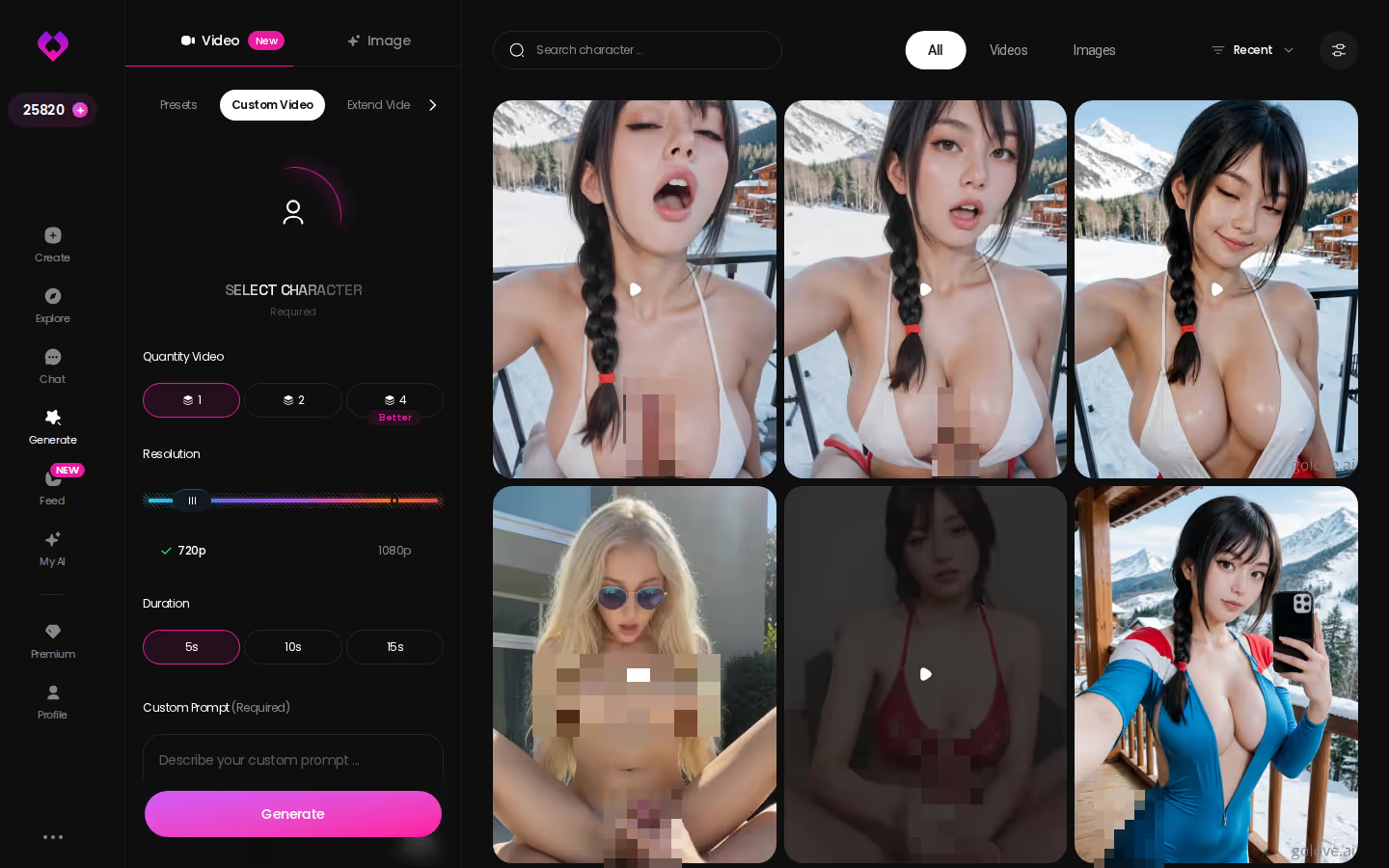
Image-to-Video
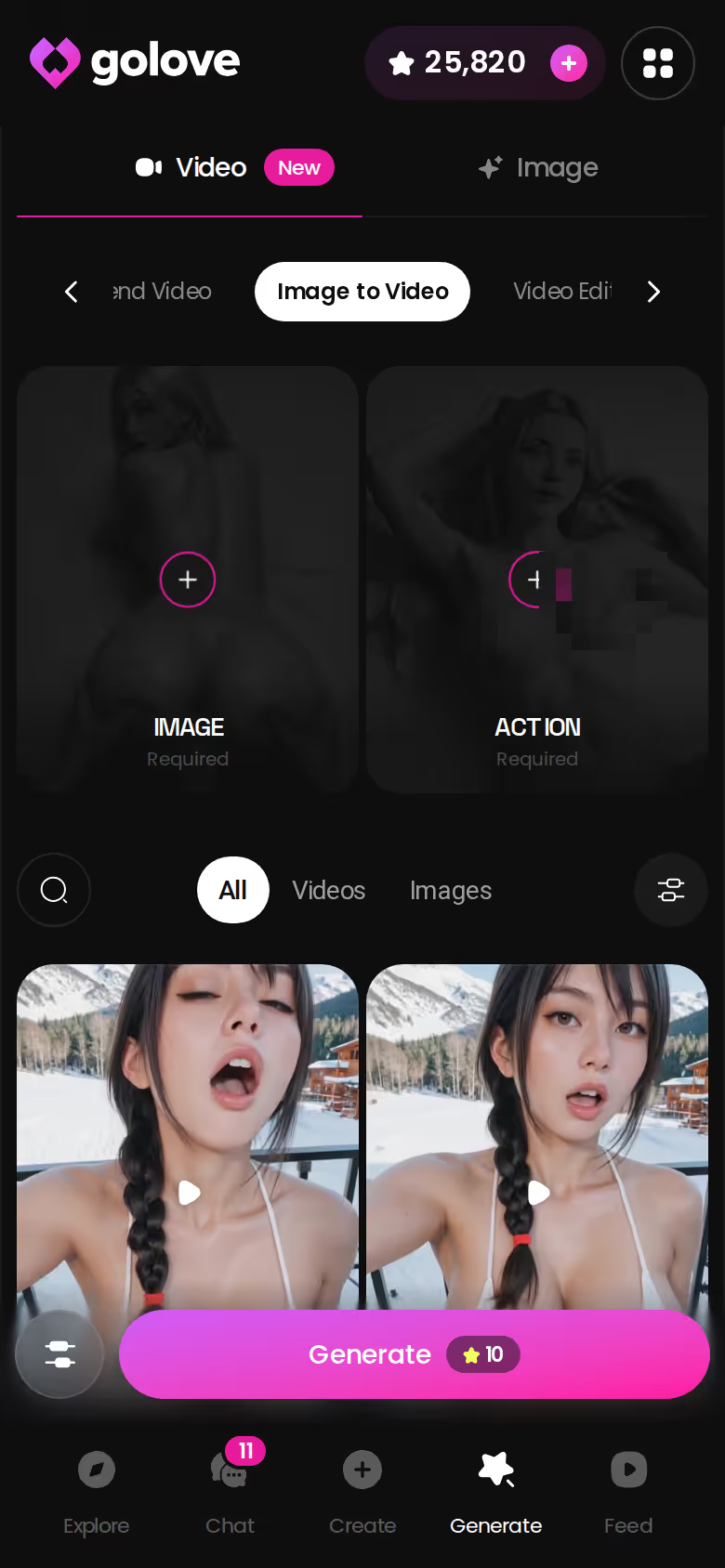
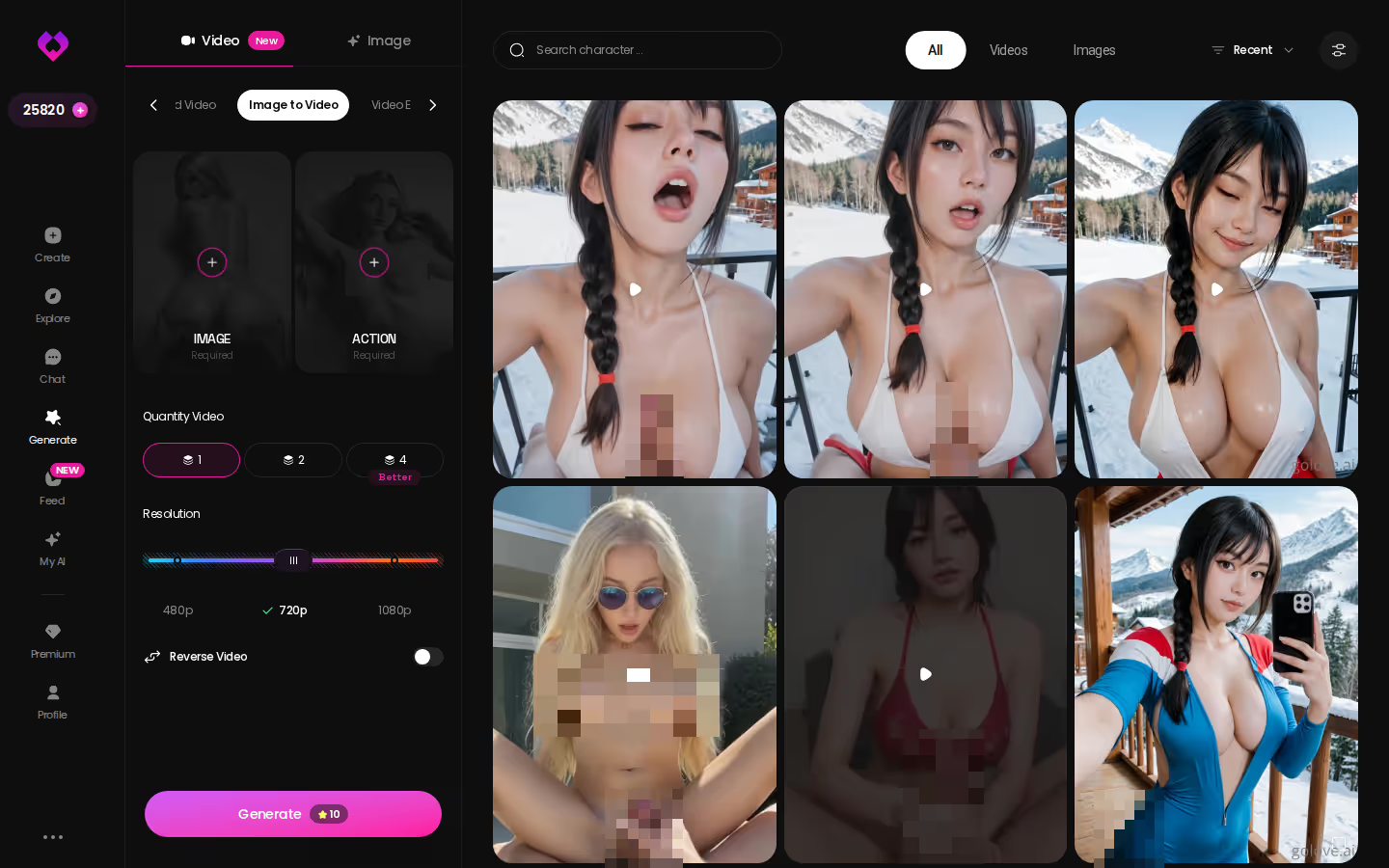
The Image tab takes a photo you already have — a Gallery shot, a chat photo she sent, a generated pose — and animates it into a moving clip. Same character, same face, now moving. The next section walks through it.
Characters you can open right now
Tap any of them and the chat starts there






Takeaway: presets for speed, Custom Video for control, image-to-video for continuity.
A Photo, Turned Into a Clip: The Image-to-Video Walkthrough
Here's the mechanic on mobile, using only what the app actually shows. Say Ella has already sent you a photo in chat after you asked for one with Request Photos. That photo isn't a dead end. In chat there's Generate Video from Photo, and it takes that exact image as the starting frame.
Tap it and you land in the Generate tab with Ella preloaded. Pick a video action from the Select Action modal — the same cards as the preset flow — and the clip gets generated from her photo rather than from scratch. The point is that the face and the setting stay hers, because the source frame is hers.
The exchange looks like this: "send me one on the balcony" → photo arrives → "now make it move" → clip arrives, same balcony, same girl, and the chat carries on as though nothing left the room. That's what a "video call" searcher actually wants, whether or not they'd phrase it that way: the person they were talking to, moving.
It works with any GoLove character or a custom one from /create — Design with AI lets you describe her in text and get a character back. That's the reason to go now rather than later: build her first, and every photo and clip afterward is of someone you designed, not a stranger from a preset grid.
Memory and Voice: Why Continuity Beats a Live Camera
The deal-breaker for most "video" apps isn't the camera. It's that the clip is of nobody in particular. A live feed of a stranger is worse than a short clip of someone who knows you — I'd take the second every time.
What GoLove Remembers
Memory is a core feature, not a plan add-on: chat history, the relationship stage you've reached through Relationship Progression, the lust level and response length you set. Ask Hannah about the quote in her bio next week and she's still the girl who quoted Camus, not a reset.
ASK HER FOR PHOTOS
She sends them right there in the chat.
Voice Consistency Across Sessions
The voice picker in Chat Settings binds a voice to the character. A live voice call on Tuesday and a voice message on Friday sound like the same woman. Apps that hand out voices per session break the illusion the moment she "answers" differently (and once it's broken, it stays broken).
Character Depth vs. Generic Bots
Every GoLove character has a profile, a bio, a per-character Gallery, and a content library with Photos and Videos tabs. A clip of her draws on that same identity — she's someone with a history before she's a prompt.
Takeaway: continuity is the call. The camera was never the point.
GoLove.ai's Free Tier: Where the Limits Are
Honesty section, because the recommendation is worth nothing without one. GoLove is not a fully free unlimited app, and if that's the only thing you want, skip it and save yourself the signup.
What the free tier actually gives you:
- Chat and Explore — jump into a conversation with any character instantly, no card required.
- Stars — 2 free Stars every 24 hours, and Stars are what generation spends. Enough to keep testing, not enough to binge.
- Feed — a limited number of new videos per day, then the "Unlock Unlimited Feed" paywall appears. Feed filters (Realistic/Anime, gender, age) are PRO-only.
Where the wall sits for video specifically: generating clips costs Stars, and per-character content libraries are unlocked with Stars too. I won't quote an exact Star cost per video, because it isn't published as a flat number and I'm not going to invent one.
Pricing: PRO runs about $19.99/month, or about $119.88/year (~$9.99/month), checked 2026-07-19 — but the number on your screen varies by region (as low as ~$12.99 in some geos) and by promo; I've seen -50% and -70% banners. Star packs run roughly $9.99 to $179.99.
Takeaway: free is a genuinely good trial, PRO is where video lives.
Reworking a Clip Instead of Starting Over
The annoying case: the clip is 90% right. Her face is perfect, the background is the one you wanted, but the action lands a beat too early or ends before the good part. Regenerate from zero and you throw away the 90%.
GoLove's answer is rework, not restart. Video Edit takes a clip you've already generated and lets you change the settings that produced it — swap the action card, the clothes, the background — while the character and source frame stay locked. Video Extend picks up where a clip stops and carries the motion on, so a 5-second preview that turned out well can become a longer take without a fresh roll of the dice.
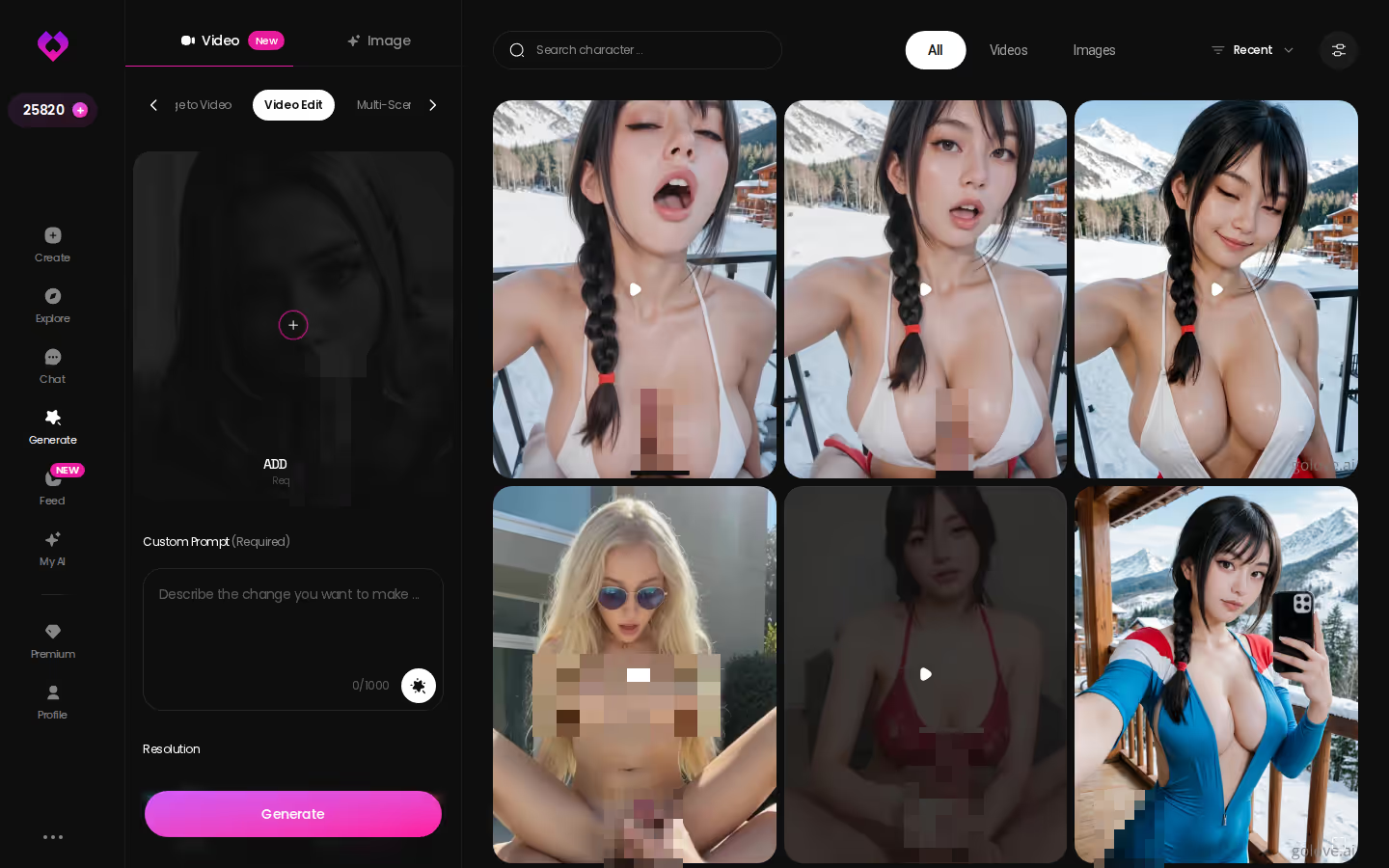
The Feed's Remix button is the same idea in reverse: hit the magic wand on any feed clip and Generate opens with that clip's exact settings, ready to tweak. Same generator every user has.
Takeaway: edit the near-miss, don't gamble on a redo.
The Scorecard, Revisited: Why GoLove Wins on Video
Back to the table, no new claims. On video capability, GoLove is the only app in the comparison with a real generator behind the button: 147 video modes, custom 720p/1080p at 5–15 seconds, and image-to-video from a photo she already sent. Candy.ai's clips are fine but narrower; Replika and Character.AI have no generated video at all, and none of the four ships a working live camera call.
On memory, GoLove ties chat, voice, photos and video to one persistent character. That's the row that turns "video call" into something that feels like a call instead of a clip of a stranger — and it's the row I'd weight heaviest even if you never open the Video tab.
Price-wise, GoLove's list sits in the same band as Replika (about $19.99/month, varies by region and promo) with a free tier that lets you test chat and the Feed before paying anything.
The winner is GoLove.ai — not because it fakes a webcam, but because it delivers the thing people are actually searching for: her, moving, remembering you.
Explore is free and instant — pick a character, start the chat, and see whether she's someone worth putting on video.
The short version: GoLove.ai covers the essentials in one place — live voice calls, memory across chats, and in-chat photos (35 poses, 21 outfits) — and the 2 daily reward stars mean you can test it before spending anything.
| What you get | GoLove.ai |
|---|---|
| Real-time voice calls | Yes — per-character voices |
| Memory across chats | Yes — remembers your details |
| In-chat image generation | Yes — 35 poses & 21 outfits |
| Daily reward stars | 2 every day |
Frequently Asked Questions
Related Articles
NSFW AI Video Creator: Which App Actually Delivers?
NSFW AI video creator: GoLove wins with photo-to-video, preset clips, and a remixable Feed tied to character memory — see it, no email.

AI NSFW Videos: Which App Actually Delivers in 2026
AI NSFW videos mostly look stiff — GoLove.ai wins on preset-card video generation plus a remixable Feed. Start with any character, no email needed.
Waifu Maker: Which App Actually Delivers?
Waifu maker tools mostly stop at one image — GoLove.ai keeps going with chat, memory, and video. See your custom waifu talk back, no email needed.
CreateHentai: Which App Actually Delivers?
CreateHentai tools compared — GoLove.ai wins on memory, chat, and photo-to-video, not just one render. See the scorecard, then try it.
This article contains affiliate links. We may earn a commission at no extra cost to you if you sign up through our links. See how we test.